



 Share
Share Google Ad Grants gives eligible nonprofits $10,000 a month in free Google Search advertising, and most organizations that receive it never come close to using it. The program is generous, the rules are strict, and the gap between those two facts is where nonprofits lose the value. What follows covers how the grant works, who qualifies, how to apply, and how to keep the account healthy once it is live.
Bottom Line
Google Ad Grants provides eligible 501(c)(3) nonprofits with $10,000 per month in free Google Search ads, which comes to $120,000 a year in advertising value. The grant covers text ads on Google Search only, not display, video, or a cash donation to your organization. To qualify you need valid charitable status, a secure website that clearly explains your mission, and a Google for Nonprofits account. Once active, the account has to hold a 5% click-through rate, avoid single-word and overly generic keywords, and maintain conversion tracking, or Google can suspend it. Approval typically takes two to three weeks from application to a live account.
What You’ll Find
- What Are Google Ad Grants for Nonprofits?
- Benefits of Google Ad Grants for Nonprofits
- Google Ad Grant Eligibility
- How To Apply for Google Grants
- Why Most Nonprofits Never Spend the Full $10,000
- How to Manage Your Google Ad Grant Effectively
- Google Ad Grant Compliance Requirements
- Hiring a Google Grant Manager
- When the Google Ad Grant Is Not the Right Fit
- 5 Top Google Grant Agencies
- Google Ad Grants FAQs
What Are Google Ad Grants for Nonprofits?
Google Ad Grants gives eligible nonprofits $10,000 a month in free Google Ads. That translates to $120,000 in annual ad spend which nonprofits can use to raise awareness, attract donations, recruit volunteers, and promote their causes through Google ads for nonprofits.
The credit does not roll over. Each month begins at $10,000 and ends at whatever you spent, with the remainder returned to Google rather than banked for later.
What Do Google Grant Ads Look Like?

Google Grant Ads appear on the highly sought-after Google search results page, just like normal Google Search Ads. They are also triggered by keywords, the same as normal Search Ads, meaning you can use Google Ad Grants for nonprofits to target people searching for phrases related to your cause. Google Grant Ads look and function the same as normal Google Search Ads, but they cost you nothing.
One difference sits under the hood. Grant campaigns carry a $2.00 maximum cost-per-click unless the account runs a Maximize Conversions bidding strategy, which lifts the cap. On competitive keywords, a $2.00 ceiling means grant ads lose auctions to paid advertisers and serve less often than the budget suggests they should.
What Google Ad Grants Cover and What They Do Not
The name causes confusion, and the distinction matters before you apply.
Google Ad Grants is advertising credit inside a Google Ads account. It is not a cash grant, not a check to your organization, and not funding you can direct toward programs, salaries, or operating costs. Nonprofits searching for Google’s philanthropic funding are looking for Google.org, which runs a separate grantmaking program with its own application and criteria.
The credit also covers a narrow slice of the Google Ads inventory:
- Included: text ads on Google Search
- Not included: display ads, YouTube and video ads, Google Maps ads, and Shopping campaigns
Nonprofits that want display or video reach can run those campaigns in a standard Google Ads account with their own budget alongside the grant account.
Nonprofits comparing free ad programs should note that Microsoft’s Ads for Social Impact, the closest equivalent on Bing and Yahoo, ended in December 2025 and stopped accepting applicants. Guides that still describe a combined Google and Microsoft grant package are out of date. The Google Ad Grant now stands alone as the major search advertising grant available to nonprofits.
Benefits of Google Ad Grants for Nonprofits
The Google Ad Grant provides eligible nonprofit organizations up to $10,000 per month of advertising credit to use on Google Ads, letting them promote their missions on Google Search. Here are the key benefits of the Google Ad Grant:
- Free Marketing: The grant provides up to $10,000 per month in Google Ads credit, which can significantly reduce or eliminate the need for out-of-pocket advertising expenses.
- Greater Impact: The Google Ad Grant allows organizations to be found by people searching phrases directly related to their cause. Nonprofits can gain substantial reach, generate awareness, and even drive donations, all at no cost.
- Cost-Effective Fundraising: Nonprofits can get in front of potential donors searching for a cause to support. This creates an opportunity for unlimited ROI, which is extremely rare in marketing.
- Targeted Advertising: The grant allows organizations to create targeted ad campaigns based on keywords, location, and demographics, ensuring their message reaches the most relevant audience.
- Free Marketing Testing: Nonprofits can test different messages, ads, and keywords to see what resonates best with their audience, allowing for a ton of opportunities to improve your ad campaigns over time.
- Data and Insights: Google Ads provides detailed analytics and reporting tools, allowing nonprofits to track the performance of their ads, understand user behavior, and make data-driven decisions.
- Global Reach: Nonprofits with a global mission can use the Google Ad Grant to connect with people worldwide, helping to build international support for their cause.
What You Can Promote Using Google Grants
As long as your organization qualifies for a Google for Nonprofits account, you can use it to promote your missions and goals. This could include:
- Attract Donations: Encourage individuals to contribute directly to your cause by using ads that lead to donation pages, helping to secure vital funding.
- Build an Email List: Promote sign-up forms to grow your email database, which you can later use to engage with potential donors, volunteers, and supporters.
- Create Awareness and Advocacy: Use ads to educate and spread the word about your organization’s mission and projects, increase visibility and engagement, and encourage the public to take action or get involved.
- Sell Memberships or Subscriptions: If your organization offers memberships or recurring subscriptions, you can use Google Ads to attract new members or subscribers.
- Recruit Volunteers: Reach out to potential volunteers by promoting specific programs or events where their help is needed.
- Promote Events and Fundraisers: Highlight upcoming events or fundraisers to drive registrations, attendance, and participation.
- Distribute Educational Resources: Use ads to direct users to valuable educational materials, research, or informative articles that align with your nonprofit’s goals.
To maximize the potential of your Google Ad Grants for nonprofits, it’s important to have the right strategy in place. Working with Google Grant account experts like those at Blueprint Digital can help you create a tailored approach that ensures your grant is being used effectively and efficiently.

Who Gets the Most Out of Google Ad Grants?
If your organization is on the smaller side, you might wonder if you can take full advantage of the Google Grants for nonprofits. Thankfully, this program is designed for all kinds of nonprofits. As long as people are searching for phrases relevant to your organization and you have a website to send those people to, you can benefit from the Google Ad Grant.
In effect, this program helps to level the playing field for nonprofits of all sizes trying to grab people’s attention.
Organizations that get the most from the grant tend to share three traits. They have a website with enough content to support a range of keywords, a clear conversion action such as a donation form or volunteer signup, and someone accountable for the account week to week. Missing any one of the three is the most common reason a grant account stalls.
Google Ad Grant Eligibility
To access $10,000 per month in free Google Ads, your nonprofit must meet specific eligibility requirements laid out by Google. These requirements ensure that the program serves legitimate, mission-driven organizations with a strong digital foundation.
What Does 501(c)(3) Status Mean for Google Ad Grants?
In the United States, your nonprofit must be officially recognized by the IRS as a 501(c)(3) organization. This designation confirms that your nonprofit is tax-exempt and operates exclusively for charitable, educational, religious, scientific, or literary purposes.
To maintain 501(c)(3) status, organizations must:
- Be registered with the IRS as a public charity or private foundation
- Avoid political campaigning or lobbying as a substantial part of their activity
- Ensure none of their earnings benefit private individuals or shareholders
- Use their resources to further their stated mission
If your nonprofit hasn’t applied for 501(c)(3) status yet, you’ll need to go through the IRS application process before becoming eligible for Google Ad Grants. You can verify your current standing using tools like ProPublica’s Nonprofit Explorer.
Examples of Nonprofits Eligible for Google Ad Grants
501(c)(3) approved organizations include:
- Animal welfare organizations: Helping protect wildlife, rescue animals, or support conservation efforts.
- Educational initiatives: Organizations offering public education, scholarships, or learning resources.
- Environmental causes: Nonprofits focused on conserving natural resources, reducing pollution, or promoting sustainability.
- Social justice and human rights organizations: Entities working to promote equality, advocate for marginalized groups, or foster civil rights.
However, there are some exceptions.
Who Does Not Qualify for Google Ad Grants
Even if you are a nonprofit, Google excludes certain types of organizations from the program. Your organization is not eligible if it is:
- A governmental entity or agency
- A hospital or healthcare institution *(Charitable branches or foundations tied to hospitals may still qualify)*
- A school, university, or academic institution *(Educational nonprofits may qualify if they’re not degree-granting or tuition-funded)*
- A fiscally sponsored project that lacks its own independent 501(c)(3) designation
These restrictions are in place to prioritize nonprofits directly serving public interest causes with educational, humanitarian, or social impact missions.
The educational exclusion catches more organizations than any other. A nonprofit that runs workshops, publishes curriculum, or offers training can still qualify, because the restriction targets degree-granting and tuition-funded institutions rather than educational work in general. Organizations denied on these grounds often qualify after clarifying how their programs are structured and funded.
Website Requirements for Google Ad Grant Approval
Your nonprofit’s website must meet quality and compliance standards. Google uses your site to assess the legitimacy and professionalism of your organization. Here’s what your website must include:
- A secure domain (HTTPS) owned by your organization
- A clear explanation of your mission, programs, and services
- No broken links or technical issues that hurt the user experience
- A non-commercial purpose. You can promote services or sell products only if they directly support your mission
- A fast, mobile-responsive design to ensure accessibility and engagement
Google also requires that your ads drive users to a relevant and content-rich landing page, not just a homepage.
If you meet all the above, you’re ready to move forward. The next step is to apply for a Google for Nonprofits account, which is required before submitting a Google Ad Grant application.
Recap the whole process from start to finish: Google Grant Eligibility & Getting Started
Unlock $10K/Month in Free Google Ads for Your Nonprofit
Eligible nonprofits can use Google Ad Grants to drive donations, attract volunteers, and amplify their mission, all without spending a dime on ads.
Not sure if you qualify? Take our quick eligibility quiz and find out in just 2 minutes.
Take the Quiz and Check Eligibility
How To Apply for Google Grants

Once you’ve confirmed your nonprofit’s eligibility for the Google Ad Grant, the next step is to submit your application. You can either handle the application process on your own or partner with a Google Ad Grant management agency that can guide you through every stage of the process.
Completing your Google Grant application yourself will be the cheapest option, but it can be quite time-consuming if you’re unfamiliar with the process. To secure the Google Ad Grant, just follow the steps outlined below.
Google Ad Grants Application Process
- Apply for a Google for Nonprofits account. You’ll need your nonprofit’s registration number (EIN in the US), physical address, and contact information. Apply here.
- Wait for verification. Google partners with Percent to confirm your nonprofit’s eligibility. This process takes 2 to 14 business days and may involve some follow-up.
- Submit your website for review. Google will check that your site meets quality standards, including HTTPS security, relevant content, and no broken links.
- Watch the required welcome video. This short video outlines how the Ad Grant works and what’s expected when managing your account.
- Activate your Google Ad Grant account. Once the previous steps are complete, submit your activation request. Google usually responds in 2 to 5 business days.
Hiring someone to apply on your behalf can have its benefits. A Google Grant agency will have experience identifying issues that might keep you from receiving a grant and can ensure you don’t get denied on a technicality or mistake. Keep in mind that an agency will need your tax ID, contact details, and some other information to submit an application.
Once you’re approved for the grant, a Google Grant agency can help you create a strategy to maintain eligibility and use your full $10,000 as effectively as possible.
How Long Does It Take to Apply for a Google Grant?

The full timeline runs about two to three weeks when nothing goes wrong:
- Prepare website and documents: 1 to 7 days. Ensure your nonprofit’s website meets Google’s requirements and gather the necessary documentation.
- Register for Google for Nonprofits: 5 to 10 business days. Submit your nonprofit for verification through Google for Nonprofits. This may take a week or longer depending on the country.
- Complete the Google Ad Grant application: 20 minutes. Fill out the application with basic details about your organization.
- Application review: 2 to 5 business days. Google reviews your application and provides feedback or approval.
For a more streamlined process, consider partnering with a Google Ad Grant company.
Why Most Nonprofits Never Spend the Full $10,000
Approval is the easy part. The harder problem is that a large share of grant recipients use only a fraction of the $10,000 available to them each month, and the unspent balance disappears at the end of every billing cycle.
Four causes account for most of the shortfall:
- Too few keywords. A grant account built on a handful of terms cannot generate enough eligible auctions to spend $10,000. Reaching the cap takes broad keyword coverage across programs, services, and the problems your audience searches for.
- The $2.00 bid cap. Accounts on default bidding cannot bid above $2.00 per click, which loses most competitive auctions. Switching to Maximize Conversions removes the ceiling, and that switch requires working conversion tracking first.
- Thin website content. Google requires ads to point at relevant, content-rich pages. A site with six pages supports six ad groups, and no amount of budget fixes that.
- No one owning the account. Grant accounts need weekly attention. Without an owner, keywords go stale, quality scores fall, and spend drifts down month over month.
Spend is a means rather than a goal. A campaign that spends $6,000 on keywords tied to donations and volunteer signups outperforms one that spends the full $10,000 on traffic that never converts. The number worth tracking is conversions per month, with spend as the constraint you are trying to use fully.
How to Manage Your Google Ad Grant Effectively
Managing a Google Ad Grant account takes more than launching a few ads. To fully use your $10,000 monthly credit and keep your account in good standing, your nonprofit needs a strategic approach, solid campaign structure, and ongoing compliance. Here’s how to get it right from day one.
1. Define Clear Goals and Target Outcomes
Before writing ad copy or choosing keywords, think about your goals.
- What do you want to achieve?
- Who are you trying to reach?
- Do you have a strong landing page to support that goal?
Whether you’re focused on donations, volunteers, or email signups, define your audience and build campaigns around their needs.
2. Choose the Right Keywords
Your keywords should connect your goal with what your audience is searching for. Looking to drive donations? Try something like “donate to charity online.” Need volunteers? A good keyword might be “volunteer for nonprofits near me.”
3. Build and Optimize Strong Landing Pages
Make sure the page your ads link to:
- Matches the goal of your ad (donate, sign up, apply)
- Loads quickly on all devices
- Uses HTTPS for security
- Clearly communicates your mission
Your landing page experience plays a big role in whether visitors take action.
4. Track Conversions from the Start
Conversion tracking helps you measure if your ads are achieving your goals. It is also required to stay compliant with the program. You can track conversions using tools like Google Tag Manager, Google Analytics, or custom code. Without this step, it is difficult to improve your results or keep your account active.
5. Maximize Your Monthly Spend
Broad keyword coverage, strong quality scores, and ad copy that earns clicks are what move an account toward the $10,000 cap. The section above covers the four causes of underspending and how to fix each one.
6. A/B Test Your Campaigns
Once your campaigns have been running for a month or two, begin testing small changes. This could include ad headlines, descriptions, landing page layouts, or bidding methods. Let the data guide your next steps. Testing helps you find what resonates most with your audience.
Google Ad Grant Compliance Requirements
Staying compliant with Google Ad Grants policies is crucial for maintaining access to the program. Google has clear rules about how ads should be structured, the types of keywords allowed, and performance requirements that must be met. Failure to comply can result in account suspension or deactivation.
Required Google Ad Grant Policies
- No single-word keywords permitted. Single-word keywords are prohibited under the Ad Grants policy, with some exceptions for branded terms and medical conditions. To filter these out, go to your Google Ads account, select “Campaigns,” then filter for single-word keywords and pause them unless they meet an exception.
- No overly generic keywords. Avoid terms like “free videos” or “today’s news.” They don’t clearly reflect user intent and often perform poorly. Focus on keywords specific to your nonprofit’s mission and audience, with a clear link to your organization’s services or content.
- No keywords with a quality score of 1 or 2. Google requires all active keywords to have a quality score of 3 or higher. Set up an automated rule to pause low-scoring keywords, and add the Quality Score column to your keyword view so you can check regularly.
- Maintain a 5% click-through rate. A CTR of at least 5% is required each month. Accounts that fall below the threshold for two consecutive months may be suspended. To improve CTR, pause keywords driving impressions without clicks and focus on high-intent terms with a strong performance history.
- Conversion tracking. Accounts using Smart Bidding strategies must implement valid conversion tracking. Track meaningful conversions such as donations or volunteer signups to demonstrate campaign effectiveness. Use Google Analytics to set goals and import them into Google Ads.
- Ad structure and extensions. Each ad group should contain at least two ads, and every campaign should include a minimum of two ad groups. Adding at least two sitelink extensions further improves performance.
- Annual program survey. All nonprofits participating in Google Ad Grants must complete an annual program survey. Fill it out when prompted to avoid account suspension.
Check our full guide to Google Ad Grant website requirements and account structure.
How To Stay Compliant and Avoid Suspension
With all of the rules involved, it can be difficult to stay compliant. Any suspension could cost valuable impressions, clicks, and possible conversions. Here are a few ways to make sure you stay compliant:
Hire a grant manager. If no one on your team can manage the account weekly, working with a Google Grant agency can help you avoid compliance pitfalls and keep your account active.
Use automated rules. Set rules to pause low-quality keywords or trigger alerts when CTR drops. Automation helps, but manual review is still essential.
Know the policies. Always double-check Google’s list of requirements before making campaign changes. Even small violations like a poor keyword or outdated landing page can trigger account issues.
Why Google Ad Grant Accounts Get Suspended or Denied
Suspensions and denials cluster around a short list of causes, and most are recoverable once you know which one applies.
Common reasons for denial at application:
- Missing or unverifiable 501(c)(3) documentation
- A website without HTTPS, or a domain not owned by the organization
- An organization type Google excludes, most often schools and healthcare institutions
- Thin website content that gives Google too little to evaluate
Common reasons for suspension after activation:
- CTR below 5% for two consecutive months
- Prohibited keywords left active in the account
- A lapsed annual program survey
- Policy violations in ad copy or on landing pages
Reactivation is usually possible. It requires identifying the specific violation, correcting it across the account, and submitting a reactivation request through Google. Accounts suspended for CTR problems generally need a keyword and ad copy overhaul before Google will restore them, because the underlying performance issue has to be fixed rather than appealed.
Can You Lose Google Grants Eligibility?
If your nonprofit loses eligibility or breaks Google’s advertising policies, you may lose access to the Google Ad Grant temporarily or even permanently. Your team should stay active in your campaigns. Optimize your Google Ad Grant account strategy consistently to keep your account from being suspended.
If you don’t have someone who can spend hours on the account each week, it may be time to consider hiring a Google Grant manager.
Hiring A Google Grant Manager
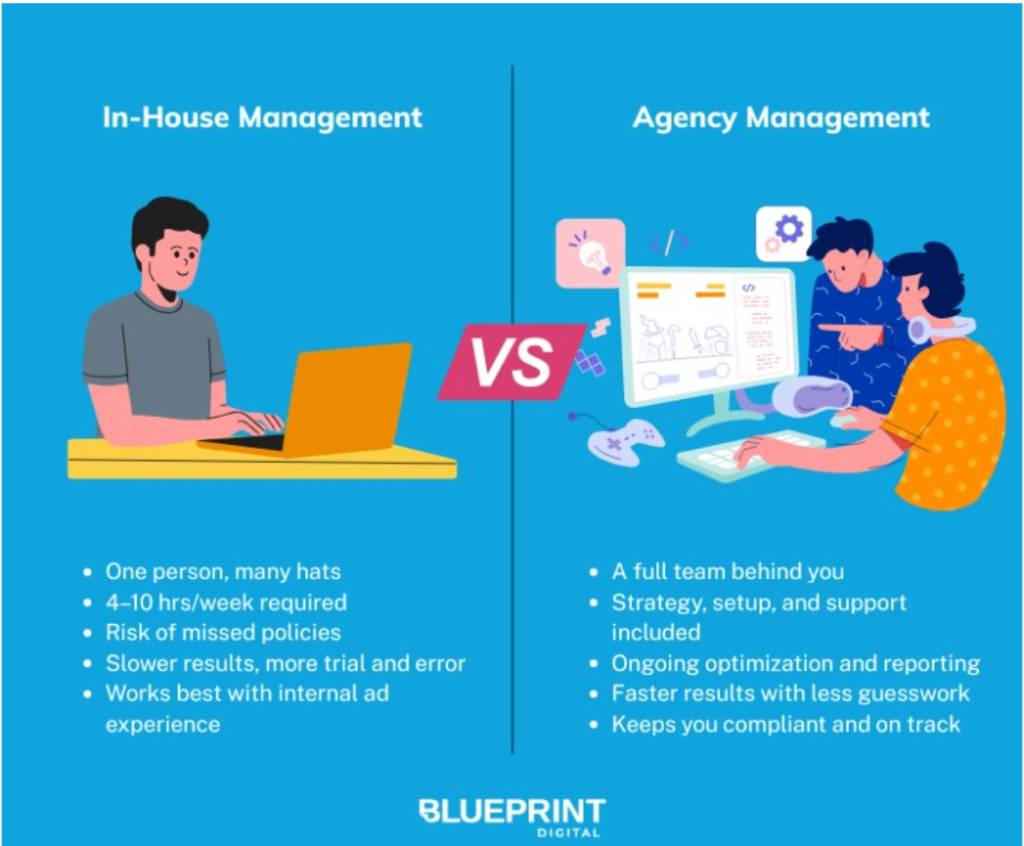
Should you hire a Google Grants Manager? Unless your organization has someone who can consistently dedicate at least 4 to 5 hours per week to managing your Google Ad Grant, hiring a professional manager is often the best way to protect your account and get results. A qualified agency will help you make full use of your $10,000 monthly ad credit, keep your campaigns compliant, and build a strategy tailored to your mission.
What Google Grant Management Agencies Do
A Google Ad Grant manager takes full ownership of your account, guiding it from initial application through active campaign management. Their role is both strategic and technical, helping your nonprofit avoid common pitfalls while building campaigns that produce meaningful results.
Their responsibilities typically include:
- Setting up your Google for Nonprofits and Ad Grant accounts
- Writing keyword-driven ad copy tailored to your mission
- Researching and selecting high-performing keywords
- Tracking conversions and setting up proper analytics
- Creating and optimizing landing pages for better user engagement
- Monitoring campaign performance and refining strategy as needed
More advanced agencies also conduct compliance audits, troubleshoot policy violations, and handle account reactivations if your grant gets suspended. In many cases, they maintain direct relationships with Google representatives, which can help resolve issues more quickly.
Benefits of Hiring a Professional Google Grant Manager
Partnering with a Google Grant expert helps your nonprofit avoid delays, make smarter decisions, and stay in good standing with Google.
Key advantages include:
- Faster setup with fewer errors during application or onboarding
- Better targeting through expert keyword research and campaign structure
- Consistent management with time dedicated to testing and improvement
- Policy compliance to reduce risk of suspension or deactivation
- Account recovery support in case your account is flagged or shut down
- Landing page optimization to boost engagement and conversions
With a skilled manager in place, your campaigns can move beyond the basics and start generating measurable value.
Cost of Google Ad Grant Management
Google Grant management typically ranges from $750 to $2,000 per month, depending on the agency and level of service. Lower-cost providers may handle basic campaign setup but offer limited support if your account gets flagged or deactivated. Higher-tier agencies usually provide deeper strategy, ongoing testing, and hands-on troubleshooting, especially valuable if your team lacks in-house marketing expertise.
Weigh the fee against the credit at stake. A $1,000 monthly fee against $10,000 in monthly advertising is a 10% management cost, and it only makes sense if the manager moves spend and conversions well past where your team would take them alone.
How to Hire the Right Google Grant Manager
- Look for a certified Google Partner. These agencies have completed Google Ads training certifications and have managed a significant enough portfolio to qualify as a certified Google Partner. Working with Google Partners gives you peace of mind knowing they won’t be wasting your valuable grant.
- Look for an agency that has experience with Google Ad Grants. Not every Google Ads agency has worked with a grant account before, and they cannot be handled in the same way. To make sure you don’t lose access to the grant, partner with an agency that has been around the block.
- Ask how they handle suspensions. Reactivation experience separates agencies that manage grants from agencies that manage ads. Ask how many accounts they have recovered and how long it took.
- Schedule a consultation to discuss your goals. Meet with the people who will be managing your account and make sure they are aligned with the needs of your organization.
- Don’t lock into a 12-month contract. If the agency you choose can’t drive results or take full advantage of your grant, you need the flexibility to find a better agency for your organization.
How to Get the Most out of Your Google Ad Grant Management
- Clearly communicate your goals: Be open about your organization’s mission and what you hope to achieve with Google Ads. Whether you’re focusing on increasing donations, raising awareness, or recruiting volunteers, sharing this information will help your manager develop the best strategy.
- Provide feedback on keywords and messaging: While your manager will handle most of the technical work, you know your audience best. Give feedback on the messaging and keywords to ensure they resonate with your target audience.
- Allow time for success: Digital marketing takes time to optimize. Give your campaigns at least 90 days to see significant results, as this allows time for testing and refinement.
- Give direct feedback: Don’t hesitate to provide honest feedback, both positive and negative, so that your manager can adjust campaigns as needed.
When the Google Ad Grant Is Not the Right Fit
The grant is worth pursuing for most eligible nonprofits, though a few situations call for fixing something else first.
- Your website has fewer than 10 substantial pages. Google evaluates site quality at application, and a thin site limits how many ad groups you can build. Publishing content first raises both your approval odds and your spend ceiling.
- Nobody can own the account. An unmanaged grant account drifts out of compliance within a few months. If no staff member or agency can commit weekly time, the suspension risk outweighs the benefit.
- Your audience does not search for what you do. Search advertising captures existing demand. Organizations serving a population that does not search for their category get more from outreach, partnerships, or paid social.
- You need funding rather than visibility. The grant buys attention, not operating revenue. Nonprofits with an immediate budget gap should look at Google.org and traditional grantmakers instead.
5 Top Google Grant Agencies
If you’re looking to partner with a Google Grant management agency, several experienced firms specialize in this work. Compare a few before committing, and ask each the questions above.
1. Blueprint Digital
Performance-Driven Digital Marketers Based In Atlanta, Georgia
Blueprint Digital is an Atlanta-based full-service marketing agency trusted by nonprofits, startups, and Fortune 500 brands. With experience across 70+ industries, Blueprint is known for building performance-driven campaigns that generate measurable outcomes.
Our team has deep expertise in managing Google Ad Grants, helping nonprofits stay compliant, increase visibility, and turn ad traffic into donations, signups, and volunteer engagement. Working with ROI Ministry, a nonprofit that identifies high-impact Christian charities, we lifted average monthly ad spend by 252% and generated 107 new donations and 935 new email subscribers. Founder and Director Tim Barker put it plainly:
Blueprint has been a godsend to our organization. They do what they say they’re going to do. They spend the full $10k of our grant and we’ve had record donations year over year.
As a full-service agency, Blueprint also supports long-term growth through integrated marketing:
- Digital Strategy: Blueprint will turn your goals into an effective campaign strategy, ensuring that every ad dollar is optimized.
- SEO: Through targeted optimizations and high-quality content, Blueprint can boost your nonprofit’s search rankings and drive traffic.
- Paid Media: Blueprint plans and manages paid media campaigns that reach the right audience and drive measurable conversions across search, social, and display platforms.
- Email Marketing & Production: The team creates compelling email campaigns and high-quality content to tell your brand’s story.
2. Getting Attention
Getting Attention is a Google Ad Grant agency that works only with nonprofits, with a distributed team serving organizations in several countries. Its listed services cover Google for Nonprofits registration and the grant application for organizations that have not yet applied. For accounts already active, the work includes keyword research, account restructuring, and clearing outdated campaign data. The agency does not offer marketing services outside the ad grant space.
3. Platypus Digital
Platypus Digital is a digital agency based in the United Kingdom that works with charities and nonprofits. Its listed services include Google Ad Grants management, Google Analytics audits and health checks, and Meta advertising. Most of its clients qualify through UK charity registration rather than US 501(c)(3) status. Organizations advertising primarily to a US audience would need to confirm how it handles accounts outside the UK.
4. Digital Ninjas
Digital Ninjas is a search engine marketing agency based in Australia, and Google Ad Grant management is one line of its work alongside paid advertising. Its listed services include A/B testing of ads and landing pages, website improvements, and personalized QR codes that link printed materials to donation or registration pages. It works with nonprofits of varying sizes. Its team operates on Australian business hours.
5. Luminate Marketing
Luminate Marketing works with mission-driven organizations, including religious nonprofits. Its listed services span brand development, messaging strategy, and marketing campaigns. Specific offerings include vision workshops, logo and brand guide development, and ongoing strategy consultation. Ad Grant management is offered within broader engagements rather than as a standalone service.
Make the Most of Your $10K in Free Ads with Blueprint Digital
Getting $10,000 in free monthly ad spend is a major opportunity for any nonprofit, and the organizations that turn it into donations are the ones treating it as a managed program rather than a credit sitting in an account. With expert Google Grant account management from Blueprint Digital, you get setup, strategy, and compliance handled together, so your campaigns stay eligible and keep performing.
If you’re looking to increase donations, grow your volunteer base, or simply get more eyes on your cause, we can help you make it happen.
Schedule a discovery call or request a free campaign review, and we’ll show you what your grant account could be doing.
Google Ad Grants FAQs
What Is the Google Grant of $10,000?
The Google Ad Grant is $10,000 per month in free Google Search advertising credit for eligible 501(c)(3) nonprofits, worth $120,000 a year. It covers text ads on Google Search only and does not roll over between months. The credit is advertising value rather than cash paid to your organization.
How Do You Qualify for Google Ad Grants?
Your organization needs valid charitable status such as 501(c)(3) recognition in the United States, a secure website on a domain you own that clearly explains your mission, and a Google for Nonprofits account. Government entities, hospitals, and degree-granting schools are excluded. Google reviews both your charitable documentation and your website before approving the account.
Are Google Ad Grants Free?
Yes, Google Ad Grants is completely free. It provides free Google ads for nonprofits, offering up to $10,000 per month in ad credits. Nonprofits can use these credits to run text-based ads on Google Search without paying out of pocket. Management, whether in-house staff time or an agency fee, is the only real cost.
Are Google Ad Grants Worth It?
For most eligible nonprofits, yes, provided someone manages the account. A well-run grant account delivers steady donations, volunteer signups, and email subscribers at no media cost. An unmanaged one drifts below the 5% CTR threshold and gets suspended, which is why the deciding factor is management capacity rather than the value of the credit.
Can Small Nonprofits Use Google Ad Grants?
Yes, small nonprofits can use Google Ad Grants. As long as your organization meets the eligibility requirements and has a functioning website, you can apply. Many smaller organizations benefit from the grant to increase visibility, promote local programs, and drive donations online.
Does the Google Ad Grant Count Toward Your Budget?
No. The grant is advertising credit issued by Google and spent inside a Google Ads account, so it never passes through your organization’s accounts. Nonprofits typically report it as an in-kind contribution rather than as cash revenue or a marketing expense. Check with your accountant on how your organization should record it.
What Happens If You Don’t Spend the Full $10K?
Unused Google Ad Grant funds do not roll over to the next month. If you don’t spend the full $10,000, that amount simply goes unused. However, you can optimize your campaigns over time to increase spending and maximize your impact.
Read: 7 Ways to Use Google Ad Grants for Nonprofits
About Blueprint Digital
Blueprint Digital is an Atlanta-based, full-service digital marketing agency running SEO, PPC, paid social, marketing automation, and web development programs for organizations across the United States. Our paid media specialists manage Google Ad Grant accounts for nonprofits, covering application, compliance, and the campaign strategy that turns free ad credit into donations and volunteers. To talk through your grant account, schedule a discovery call or request a free campaign review.
Ready to Dominate Online and Grow Your Business?
Schedule time to connect with Blueprint about your online goals, or request a free review of marketing campaigns.
Related Posts

What Is Automated Lead Follow-Up and How Does It Work

Free Advertising for Nonprofits Through Google Ad Grants

Lead Scoring for B2B: How to Decide Which Leads Your Sales Team Chases



Partner with BLUEPRINT to reach your online goals, grow your business and reshape your story.
Get in touch with BLUEPRINT
Reach out to request a discovery call, a free campaign review, or for all other inquiries.