

Boost your Conversion Rate by adding User Flows to your Design Process
- Web Design
 Jul 6, 2016

 Share
Share Conceptualizing and designing the user experience of a site or app can be a challenging part of the project for any web design project. Without proper planning and processes, you’re bound to run into trouble at a later phase. This leaves you having to stitch together concepts, ultimately leading to frail UX foundation and a poor conversion rate. Implement user flows to your design process and you’ll gain a greater understanding of your site’s architecture and your user’s journey thereby creating a more optimized conversion funnel.
Site Flows vs. User Flows: A Breakdown
While they may sound like synonyms, do not be fooled. Site Flows and User Flows are different tools meant for different tasks. The two are used in unison to design and conceptualize the user experience (UX) of a site.
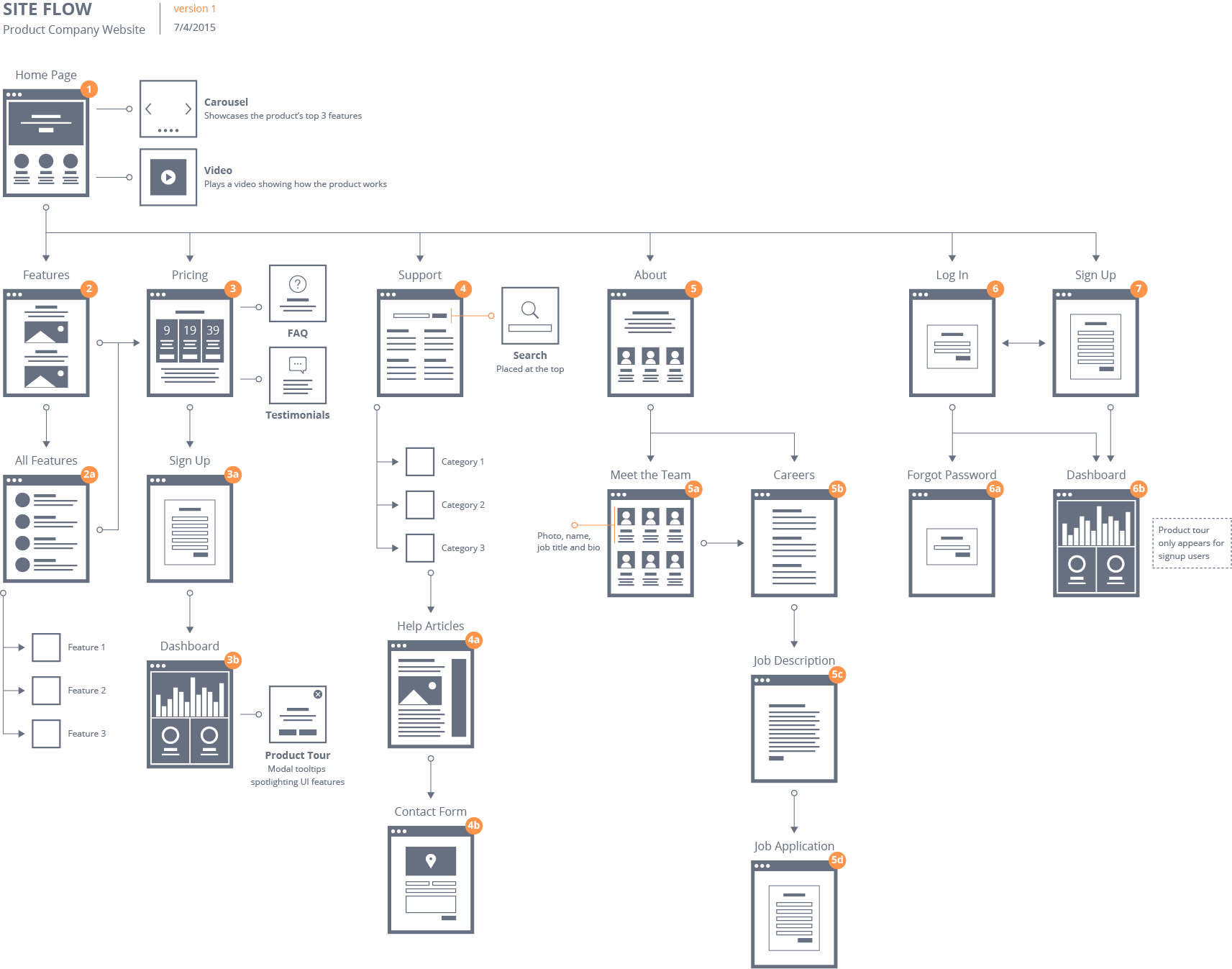
Site Flows are commonly used to help organize and present a site’s navigation in a simple hierarchical structure so the entire scope of the site’s navigation can be seen and its hierarchy made clear. Anthony from uxmovement.com uses a wonderfully fitting map analogy to illustrate that a site flow is basically like looking at a map from a bird’s eye-view. You gain a general understanding of where you can go, and gives you enough information to gauge the size of the site.
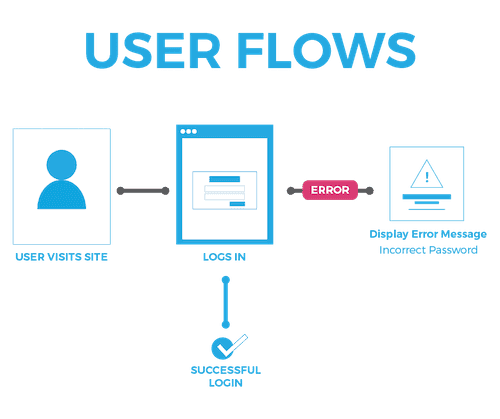
Anthony continues with his cartographic analogy by saying that a user flow is much like looking at directions from point A to point B like in Google Maps.

This view offers more specific information that allows you to efficiently travel from one place to another; see the difference?
Creating User Flows
User flows can be made in two basic ways: by using a vector-based graphics software like Adobe Illustrator or Sketch, or by simply sketching them out on multiple pieces of paper. I’ve read that some designers use Adobe Photoshop too, especially since the introduction of Artboards to PS. But since you’re going to be dealing with many artboards in any user flow, a raster-based program like Adobe Photoshop should be avoided due to the dramatic increase in file size due to the rasterization of assets. There are also a myriad of template-like resources available to use when you are on a time-crunch or if you don’t want to take the time to make your own.
How User Flows Increase Your Conversion Rate
When users are confused or lost, they leave. It’s that simple. This obviously results in a decrease in your conversion rate. By implementing worthwhile user flows, you are effectively planning ahead for your user and ensuring that they remain on their path down the conversion funnel.
Undoubtedly, user flows really shine when planning for micro-interactions on a site. Tasks such as changing your username or email on a site can be examples of micro-interactions that can be greatly underestimated when proper planning and user flow implementation isn’t accounted for. User flows minimize the steps and smooth out the process of such tedious micro-interactions by laying the directional travel path from point A to point B in a clear and succinct manner.
User Flows Will Benefit the Whole Team
User flows are not just for the designers on a project. Everyone on the team will have a better understanding of the site with the use of user flows. SEO managers will have a better understanding of what information architecture they need to leverage, developers will know the specifics of each page’s interactions and functionality, and QA will have a foundation to compare the final deployed site with the original user flow layout. Everyone wins when you go with the flow.
Ready to Dominate Online and Grow Your Business?
Schedule time to connect with Blueprint about your online goals, or request a free review of marketing campaigns.
Related Posts

What Is Automated Lead Follow-Up and How Does It Work

Free Advertising for Nonprofits Through Google Ad Grants

Lead Scoring for B2B: How to Decide Which Leads Your Sales Team Chases



Partner with BLUEPRINT to reach your online goals, grow your business and reshape your story.
Get in touch with BLUEPRINT
Reach out to request a discovery call, a free campaign review, or for all other inquiries.