



 Share
Share Using social media is becoming increasingly important in establishing and promoting your brand. As a front end developer, it is important to know the basics of social media to work seamlessly with a team to achieve marketing goals.
If you have a CMS installed on your website (I recommend WordPress), you could easily install a plugin that fits your needs. However, if you would like to manually implement them in your website, please read on.
It should also be said before I begin that these meta tags should be included in the <head> section of your website.
Facebook Meta Tags
Facebook uses Open Graph to define objects. Below are some sample meta tags:
<meta property="og:title" content="Article or Page Title" />
<meta property="og:type" content="article" />
<meta property="og:image" content="http://yourdomain.com/path/to/your/img/
picture.png" />
<meta property="og:site_name" content="Website Name" />
<meta property="og:description" content="Description" />
A lot of these meta tag properties are self explanatory. It is important to note that there are many values available for og:type, and article would most aptly describe a website page or blog post. Also, og:image should be a JPG, PNG, or GIF file larger than 50×50 px. It is also a good idea to set the og:image because if you don’t the image that appears may not be relevant to the link or there may not be an image at all.
Twitter Cards
When you share something on Twitter, you may have noticed that they look something like this:
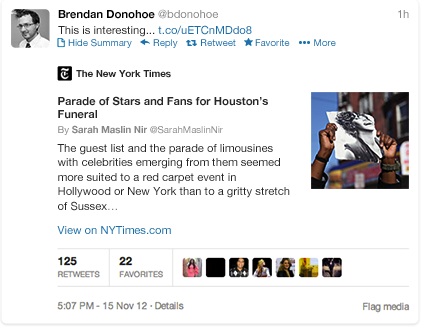
To optimize your content to look like that, you need to use these meta tags to create your Twitter Card:
<meta name="twitter:card" content="summary">
<meta name="twitter:site" content="@site_username">
<meta name="twitter:title" content="Title for link being shared">
<meta name="twitter:description" content="Description up to 200 characters.">
<meta name="twitter:creator" content="@creator_username">
<meta name="twitter:image:src" content="http://yourdomain.com/path/to/your/img/
picture.png">
It is important to note that you could specify the website and writer Twitter handles separately using twitter:site and twitter:creator. Also, twitter:card specifies the type of content being shared, and summary is one that would generally work well for regular webpages and blog posts.
For the full list of possible meta tags, check out this reference in Twitter Developers Documentation.
What about Google+?
For the +snippet on Google+, it is recommended to use the schema.org microdata, which was developed by Google, Microsoft, and Yahoo! to help with search engine result quality. However, if you don’t have schema.org microdata in your markup, don’t worry. Google+ will use Facebook Open Graph meta tags for +snippets if you use the Facebook meta tags.
Conclusion
These meta tags are not required on a website. However, having them will give you more control over how your content is shared on social media sites as well as make your content appear better when shared.
Other good social media tools to implement in your website are the share buttons. To find out how to implement the share buttons manually in your website, check out this article: How to add social sharing buttons to WordPress posts manually.
Ready to Dominate Online and Grow Your Business?
Schedule time to connect with Blueprint about your online goals, or request a free review of marketing campaigns.

Related Posts

What Is Automated Lead Follow-Up and How Does It Work

Free Advertising for Nonprofits Through Google Ad Grants

Lead Scoring for B2B: How to Decide Which Leads Your Sales Team Chases



Partner with BLUEPRINT to reach your online goals, grow your business and reshape your story.
Get in touch with BLUEPRINT
Reach out to request a discovery call, a free campaign review, or for all other inquiries.